
Website Optimization for Beginners is one of the most important skills for anyone building a website. A faster, user-friendly website improves visitor experience and supports better SEO performance.
Think about the last time you visited a slow website. Chances are you became frustrated and left before the page fully loaded. Your visitors feel the same way. That’s why website optimization isn’t just about improving SEO—it’s about creating a better experience for everyone who visits your site.
Your website may have excellent content, attractive images, and proper SEO, but if it loads slowly or provides a poor user experience, visitors may leave before reading your content. This can reduce engagement, increase bounce rates, and affect your search engine rankings.
Website optimization is the process of improving your website’s speed, usability, and overall performance so visitors can easily access your content on any device. A well-optimized website creates a better experience for users and helps search engines crawl and index your pages more efficiently.
In this guide, you’ll learn what website optimization for beginners is, why it matters, and the practical steps beginners can follow to improve their website’s performance.
What Is Website Optimization?
Website optimization is the process of improving different aspects of your website to make it faster, easier to use, and more effective for both visitors and search engines.
It includes improving page speed, reducing loading time, optimizing images, enhancing mobile usability, fixing technical issues, and creating a smooth browsing experience.
The goal isn’t just to make a website look good—it’s to help visitors find information quickly and encourage them to stay longer.
Why Website Optimization for Beginners Matters
Optimizing your website provides benefits for both users and search engines.
Some important advantages include:
- Faster page loading times
- Better user experience
- Lower bounce rates
- Improved SEO performance
- Higher chances of ranking in search results
- Increased visitor engagement
- Better conversion rates
- Improved mobile usability
Every improvement may seem small on its own, but together they can make a significant difference. A website that loads quickly and is easy to navigate encourages visitors to explore more pages instead of leaving after just one.
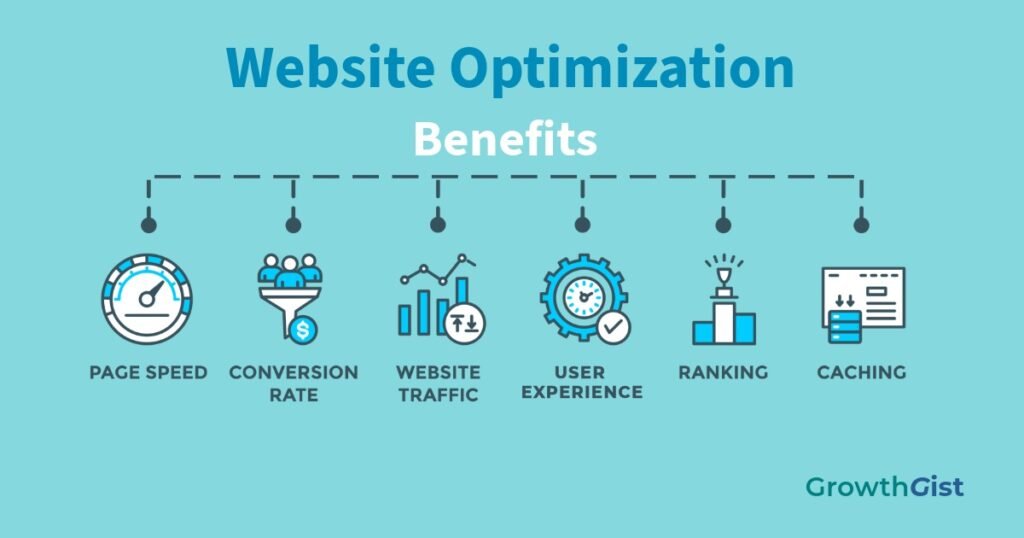
The infographic below summarizes the main benefits of website optimization discussed in this section.
Key Elements of Website Optimization
Website optimization involves several areas working together.
Page Speed
Visitors expect websites to load quickly. If a page takes too long, many users leave before it finishes loading.
For example, imagine two websites offering the same information. If one loads in two seconds while the other takes seven seconds, most people will choose the faster website without thinking twice.
Improving page speed helps create a better experience and supports better SEO performance.
Mobile Friendliness
Most users browse websites on smartphones.
Your website should automatically adjust to different screen sizes, with readable text, clickable buttons, and properly sized images.
Image Optimization
Large image files often slow down websites.
Compressing images, using modern file formats, and uploading correctly sized images help reduce loading time without noticeably affecting quality.
For example, instead of uploading a 5 MB image directly from your camera, resize and compress it before uploading to your website.
Clean Website Structure
A clear website structure helps visitors navigate easily.
Use logical categories, simple menus, and organized internal links so users can quickly find related content.
For example, if someone is reading about keyword research, they should easily discover your articles about on-page SEO and SEO content writing.
Technical Performance
Technical improvements include:
- Fixing broken links
- Reducing unnecessary code
- Using browser caching
- Removing unused plugins
- Improving server response time
These improvements help your website perform more efficiently.
Simple Ways to Optimize Your Website
You don’t need advanced technical knowledge to make meaningful improvements.
Here are some beginner-friendly optimization techniques.
Use Fast Web Hosting
Your hosting provider affects your website’s performance.
Reliable hosting offers faster servers, better uptime, and improved security.
If your website regularly loads slowly despite optimization, your hosting may be the cause.
Compress Images Before Uploading
Always reduce image size before uploading.
Smaller image files load faster while maintaining good visual quality.
Avoid uploading high-resolution images when smaller versions work perfectly.
Enable Caching
Caching stores parts of your website temporarily so returning visitors don’t need to download everything again.
This helps pages load much faster.
Many WordPress caching plugins make this process simple.
Minify CSS and JavaScript Files
Websites use CSS and JavaScript files to control design and functionality.
Minifying these files removes unnecessary spaces and characters, making them smaller and faster to load.
Many optimization plugins can do this automatically.
Remove Unnecessary Plugins
Every plugin adds additional code.
Too many plugins can slow down your website and sometimes create compatibility issues.
This doesn’t mean you should avoid plugins altogether. Instead, focus on using well-maintained plugins that genuinely add value to your website, and remove those you no longer need.
Keep Everything Updated
Update your:
- WordPress version
- Theme
- Plugins
Updates often include performance improvements, bug fixes, and security enhancements.
Optimize Your Website for Mobile Users
Since most visitors browse on mobile devices, mobile optimization is essential.
Make sure your website has:
- Responsive design
- Readable font sizes
- Proper button spacing
- Fast loading pages
- Easy navigation
- Optimized images
Always test your website on different screen sizes before publishing important content.
Improve User Experience
Website optimization isn’t only about speed.
A positive user experience encourages visitors to stay longer.
Some simple improvements include:
- Easy-to-read content
- Clear headings
- Short paragraphs
- Consistent fonts
- White space between sections
- Visible navigation menus
- Internal links to related articles
When visitors enjoy using your website, they’re more likely to return.
Common Website Optimization Mistakes
Many beginners unknowingly make mistakes that reduce website performance.
Avoid these common issues:
- Uploading oversized images
- Installing too many plugins
- Ignoring mobile optimization
- Using slow or unreliable hosting
- Leaving broken links unfixed
- Using complex navigation menus
- Not updating WordPress regularly
- Ignoring page speed reports
Fixing these problems can noticeably improve your website.
Useful Website Optimization Tools
Several free tools help analyze website performance.
Some popular options include:
- Google PageSpeed Insights
- GTmetrix
- Google Search Console
- Lighthouse
- Pingdom Website Speed Test
Don’t worry if the reports seem technical at first. Start by fixing the most important recommendations, such as improving page speed or optimizing images, and gradually work through the remaining suggestions.
These tools identify performance issues and suggest practical improvements.
Best Practices for Website Optimization
Follow these best practices to maintain a fast and user-friendly website:
- Optimize images before uploading.
- Use reliable hosting.
- Keep WordPress, themes, and plugins updated.
- Remove unnecessary plugins.
- Enable browser caching.
- Test website speed regularly.
- Improve mobile usability.
- Fix broken links.
- Organize your website structure.
- Monitor performance over time.
Website optimization isn’t a one-time task. Regular maintenance keeps your website performing well as it grows.
Final Thoughts
Website optimization for Beginners is an ongoing process rather than a one-time task. As you publish more content and your website grows, regularly reviewing its performance will help you provide a better experience for both visitors and search engines.
Website optimization is one of the most important parts of building a successful website. A fast, well-organized, and user-friendly site not only improves the visitor experience but also supports better search engine rankings.
You don’t need to implement every optimization technique at once. Start with the basics, such as compressing images, improving page speed, removing unnecessary plugins, and optimizing for mobile devices. As your website grows, continue monitoring its performance and making gradual improvements.
Small improvements made consistently can lead to a faster, more reliable website that benefits both your visitors and your long-term SEO efforts.es helps maintain a high-quality website as your content library continues to grow.

GrowthGist was founded by Ishwar Solanki to provide clear, practical, and beginner-friendly content on SEO, blogging, AI tools, productivity, website optimization, and digital growth. The platform helps readers build valuable digital skills and strengthen their online presence through actionable insights and reliable information.