
XML Sitemap for Beginners is an important topic for anyone who wants search engines to discover and index website pages more efficiently.
An XML sitemap is one of the simplest technical SEO elements that can help search engines discover and understand your website. While a sitemap does not guarantee higher rankings, it can make it easier for search engines to find important pages and content.
For beginners, the term “XML sitemap” may sound complicated, but the concept is straightforward. A sitemap acts like a roadmap of your website, helping search engines locate pages, posts, categories, and other content more efficiently.
Whether you run a blog, business website, or online store, understanding how XML sitemaps work can help improve website visibility and support your overall SEO strategy.
Many website owners never think about their sitemap until they encounter indexing issues or notice that new content is taking longer than expected to appear in search results. Understanding how a sitemap works early can help prevent confusion and make website management easier as your content grows.
What Is an XML Sitemap?
An XML sitemap is a file that contains a list of important URLs on your website. It provides search engines with information about your pages and helps them discover content that should be crawled and indexed.
The sitemap is written in XML (Extensible Markup Language), which is designed for machines rather than human visitors.
A typical XML sitemap may include:
- Blog posts
- Website pages
- Categories
- Tags
- Images
- Videos
Search engines use this information to better understand your site’s structure and discover important pages more efficiently.
Why XML Sitemap for Beginners Matters for SEO?
Although search engines can discover pages through links, a sitemap provides an additional way to find content.
Benefits include:
- Faster discovery of new pages
- Better crawling of large websites
- Easier identification of important content
- Improved website organization
- Support for technical SEO efforts
Although a sitemap is helpful, it should not be viewed as a replacement for good website structure. Search engines still rely heavily on internal links and overall site organization to understand relationships between pages and discover new content naturally.
A well-maintained XML sitemap can also help search engines focus their crawl budget more efficiently by highlighting the most important pages on your website.
A sitemap becomes especially useful when a website is new or has limited backlinks.
How XML Sitemaps Work
When a search engine visits your sitemap, it receives a list of URLs that you want it to crawl.
The sitemap may also include information such as:
- Last modification date
- Page priority
- Update frequency
Search engines then decide when and how often to crawl those pages.
It is important to understand that a sitemap helps search engines discover content, but it does not force them to index every page.
Types of XML Sitemaps
The most common types of XML sitemaps include:
- Page Sitemap – Contains important website pages such as About Us and Contact Us pages.
- Post Sitemap – Includes blog articles and other published content.
- Image Sitemap – Helps search engines discover and understand images.
- Video Sitemap – Provides information about video content on a website.
- News Sitemap – Used primarily by websites that publish news content regularly.
Most beginner websites only need standard page and post sitemaps.
Does Every Website Need a Sitemap?
Not every website absolutely requires one, but most websites benefit from having a sitemap.
A sitemap is particularly useful if:
- Your website is new
- You publish content regularly
- Your site has many pages
- Internal linking is still limited
- Some pages are difficult to discover
For small websites with strong internal linking, search engines may still find content without a sitemap. However, creating one is considered a best practice.
How to Find Your Sitemap
Many SEO plugins generate a sitemap automatically.
Common sitemap URLs include:
- yourdomain.com/sitemap.xml
- yourdomain.com/sitemap_index.xml
You can visit these URLs in your browser to check whether a sitemap exists.
How to Create an XML Sitemap
Creating a sitemap is easy with modern SEO plugins.
Popular options include:
- Rank Math
- Yoast SEO
- All in One SEO
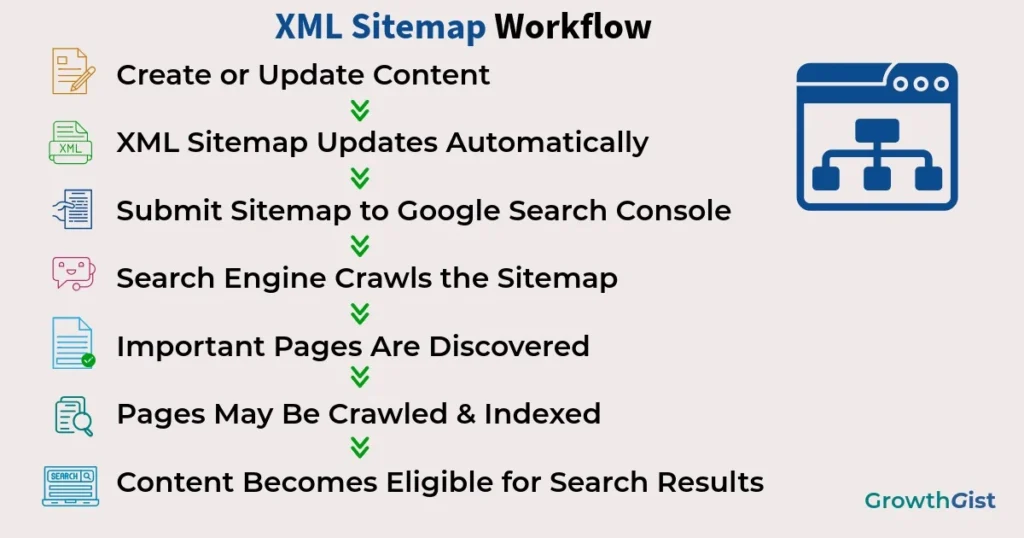
After enabling the sitemap feature, the plugin automatically generates and updates the sitemap whenever new content is published.
Most beginners do not need to manually create sitemap files.
How to Submit a Sitemap to Google
Submitting a sitemap helps Google discover your content more efficiently.
Steps:
- Open Google Search Console.
- Select your website property.
- Navigate to the Sitemaps section.
- Enter your sitemap URL.
- Click Submit.
Google will begin processing the sitemap and report any issues it finds.
After submission, it is a good idea to occasionally review sitemap reports for warnings or errors. Monitoring this information can help identify pages that may not be performing as expected and provide insights into how search engines are interacting with your website.
Common XML Sitemap Mistakes
Many website owners create a sitemap but overlook important details.
Avoid these common mistakes:
- Including noindex pages
- Adding broken URLs
- Submitting outdated sitemaps
- Including duplicate content
- Blocking important pages in robots.txt
- Forgetting to update sitemap settings
Regularly reviewing your sitemap can help prevent technical SEO issues.
XML Sitemap Best Practices
Follow these recommendations:
- Include only important indexable pages and ensure your sitemap lists the preferred canonical URLs instead of duplicate versions.
- Remove unnecessary URLs.
- Keep the sitemap updated.
- Use automatic sitemap generation when possible.
- Monitor sitemap reports in Search Console.
- Maintain a strong internal linking structure.
These practices help search engines crawl your website more effectively.
As a website expands, managing content becomes increasingly important. Having an accurate sitemap can help maintain better organization and ensure that important pages remain accessible to search engines as new posts, categories, and resources are added over time.
✅ Best Practice
Keep your XML sitemap clean by including only important, indexable pages. Excluding broken, duplicate, or noindex URLs helps search engines focus on the content that matters most.
Local businesses may also include important location pages in their sitemap.
XML Sitemap vs HTML Sitemap
Beginners often confuse XML sitemaps with HTML sitemaps.
An XML sitemap is created primarily for search engines.
An HTML sitemap is designed for human visitors and helps users navigate a website more easily.
While XML sitemaps are more important for SEO, both can contribute to better website organization.
Final Thoughts
An XML sitemap for beginners is a simple yet valuable SEO tool that helps search engines discover important pages on your website. While it is not a direct ranking factor, it supports crawling, indexing, and website organization.
For beginners, using an SEO plugin to generate and maintain a sitemap is usually the easiest approach. Combined with strong content, internal linking, and technical SEO practices, a well-managed sitemap can contribute to a healthier and more search-friendly website.

GrowthGist was founded by Ishwar Solanki to provide clear, practical, and beginner-friendly content on SEO, blogging, AI tools, productivity, website optimization, and digital growth. The platform helps readers build valuable digital skills and strengthen their online presence through actionable insights and reliable information.